


GA4 is recording unusual traffic spikes from China and Singapore. These are not users, but bots
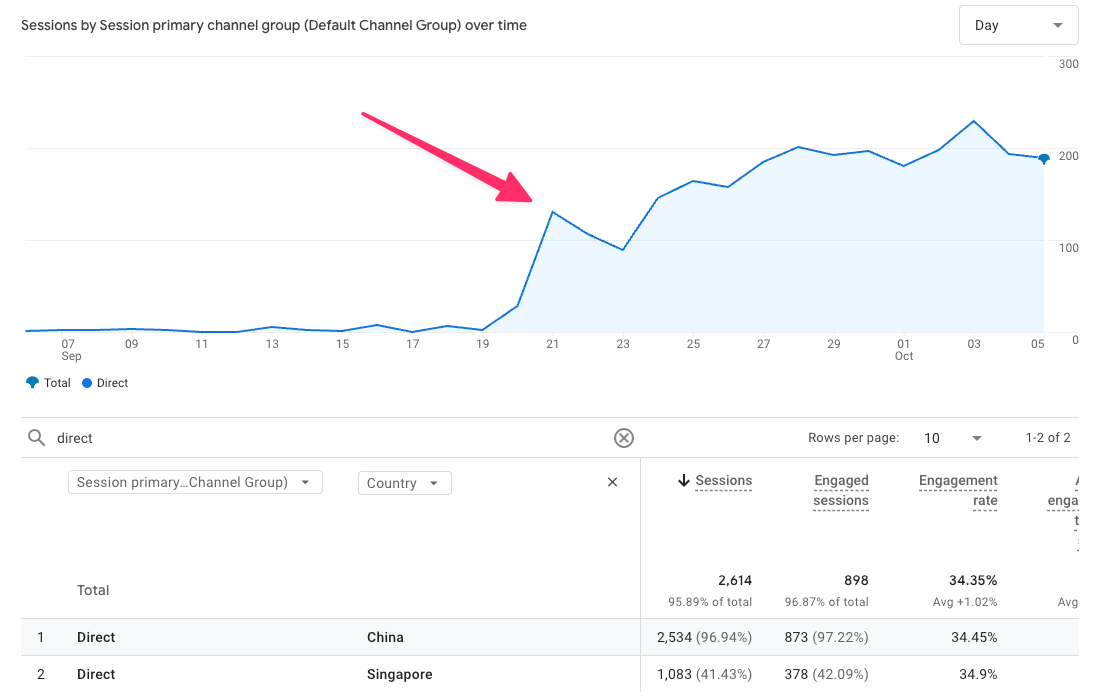
What Does Spam Traffic Look Like in GA4?
The scenario looks almost identical across many accounts:
- a sudden surge in sessions,
- dominance of the Direct channel,
- a small share from Google / Organic,
- sporadic referrals appearing as ChatGPT,
- traffic concentrated in Asia, mainly China and Singapore.
On the charts, everything spikes. In terms of data quality – everything falls apart.
Bots move chaotically across the site, often landing on URLs with filters, parameters, and combinations that no real user would click. This is traffic “for the sake of traffic,” not for a goal.

Source: https://support.google.com/analytics/thread/378622882
How Do We Know These Are Not Real Users?
Because the behavior of these sessions does not resemble any real user scenario.
They show very low engagement, no scrolling, no clicks, and no conversions. Only basic events appear, and technical data is often incomplete or marked as “(not set).”
Importantly, in many websites this traffic can account for 30–60% of all sessions within a few days, immediately distorting qualitative metrics.
What Does Google Officially Say About This Issue?
Google has confirmed that the traffic does not come from humans and that teams are working on a long-term solution. Google Analytics experts also openly admit that GA4 cannot automatically block every bot, especially when a new behavior pattern emerges.
This is a fairly transparent position, but it means that for some time GA4 data may require manual “cleaning” for analysis purposes.
Spam traffic distorts engagement rates, shortens average session duration, breaks conversion funnels, and makes geographic reports unreliable. For publishers and GA360 users, it can also have financial implications.
In practice, analytics teams spend more time explaining “what this is not” rather than analyzing what actually works.
What Workaround Does Google Recommend for Now?
Google recommends filtering data only for analysis purposes, not permanently deleting it.
The most common approach looks like this:
- identifying spam patterns (e.g., country + very short session),
- creating segments to exclude these in Exploration reports,
- analyzing data “after filtering” exclusively in this mode.
This helps restore data readability, although unfortunately only in Explorations. Standard GA4 reports remain “contaminated.”
The downside is that such filtering mainly works in Exploration mode, not in standard reports.
Is It Possible to Block This Traffic at the Source?
Some companies go a step further and try to block traffic outside GA4:
- using Cloudflare rules,
- blocking countries at the hosting level,
- server or CDN filters,
- attempts to exclude IP addresses.
Results vary. For some, it works; for others, bots adapt faster than you can save a rule. There is also the risk of blocking legitimate users or indexing bots.
Google takes a cautious approach: filter for analysis, block only when absolutely necessary.
Increased traffic from China and Singapore – remember that!
- GA4 records fake traffic from China and Singapore that bypasses bot filters.
- Google confirmed that these are not real users.
- The traffic mostly goes to Direct, but also to Organic and referrals.
- Analytics data can be seriously distorted.
- The safest solution is using segments in Explorations.
- Blocking traffic at the server level works selectively and requires caution.
For now, there is no magic “fix GA4” button. There is, however, awareness of the problem – the first step to avoiding decisions based on data that only pretends to be real.
The post GA4 is recording unusual traffic spikes from China and Singapore. These are not users, but bots appeared first on Delante.




 Čeština
 French
 Spanish
 Portuguese
 Deutsch
 Turkish
 Dutch
Dutch
 Italiano
 Russian
 Romaian
 Portuguese (Brazil)
 Greek
Greek
 Slovenčina